Most teams still talk about GenAI like it’s one ingredient: “Which model should we use?”
But real-world AI products are systems. They’re made of components that interact. And once you start thinking in components, a simple idea becomes powerful:
A periodic table isn’t just for memorizing elements. It’s for predicting reactions.
Recently, Martin Keen from IBM Technology popularized a “periodic table” style sketch for AI systems. I like it because it gives people a shared language: prompts, embeddings, vector DBs, RAG, guardrails, agents, fine-tuning, small models, and more — organized in a way that hints at what combinations are stable, useful, or risky.
In this post I’ll do three things:
Because most product debates are framed incorrectly.
People argue:
Those arguments miss the point: systems are recipes. The right question is:
What components do we need to combine — under our constraints — to produce a reliable behavior?
A periodic table helps you:
The table is organized along two axes:
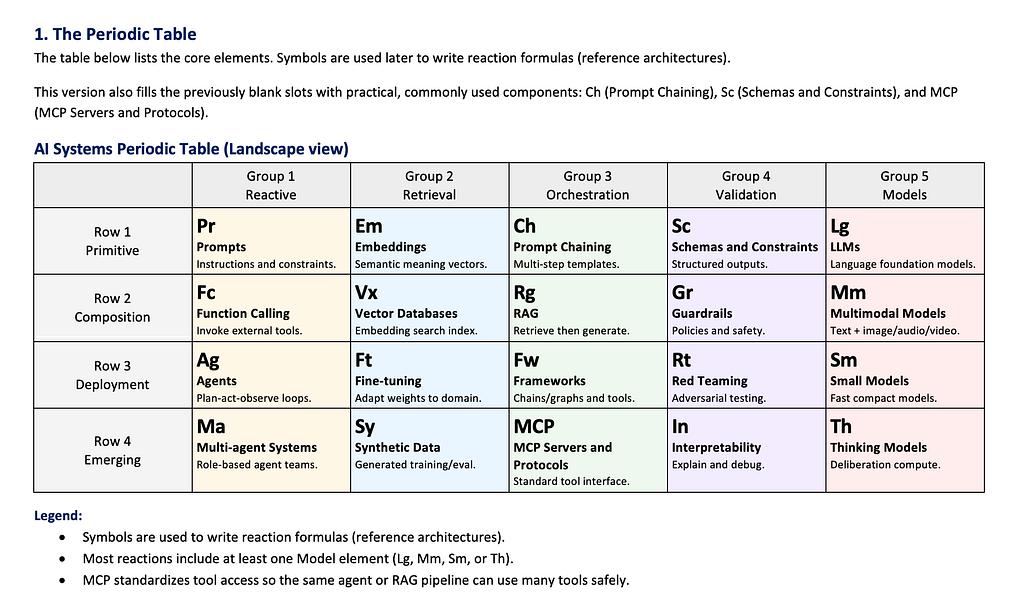
Below is a clean, “complete” version. If you’re publishing this on Medium, place your table image right here.
Pr (Prompts) — the simplest interface: language in, behavior out
Em (Embeddings) — numerical meaning representations
Ch (Prompt Chaining / Templates) — multi-step prompts, reusable templates, decomposition without tools
Sc (Schemas / Output Constraints) — structured outputs, format constraints, JSON schema, validation rules
Lg (LLM) — the general-purpose reasoning/generation engine
Fc (Function Calling) — the model triggers tools/APIs
Vx (Vector Databases) — store/query embeddings at scale
Rg (RAG) — retrieve context and ground generation
Gr (Guardrails) — runtime checks and safety filters
Mm (Multimodal Models) — text + images + audio/video inputs
Ag (Agent) — plan → act → observe loop
Ft (Fine-tuning) — bake specialization into weights
Fw (Frameworks) — glue code + orchestration (LangChain/LangGraph/AutoGen patterns)
Rt (Red Teaming) — adversarial testing: jailbreaks, prompt injection, exfiltration simulation
Sm (Small Models) — fast, cheap, deployable (edge/on-device)
Ma (Multi-agent) — multiple agents collaborating
Sy (Synthetic Data) — generate training/eval data using AI
MCP (MCP Servers / Tool Protocol Layer) — standardized tool/data access for agents and apps
In (Interpretability) — explain why models do what they do
Th (Thinking Models) — explicit reasoning loops, test-time compute scaling
Why MCP belongs here: it’s becoming the “ports and adapters” layer for AI apps — standardizing how models talk to tools and context. It’s still evolving rapidly, so it fits best as an emerging orchestration element.
If you’ve shipped a chatbot that feels useful, you almost certainly used Row2:
Row 2 is where prototypes become products.
There’s a visible progression:
Most failures in production are not “the model was dumb” but:
Validation elements are the difference between a demo and something you can trust.
When you combine elements, you get predictable product behaviors.
A few examples:
Now let’s make it concrete.
Each reaction below is written like a reusable recipe:
Goal: answer questions from internal docs without hallucinating or leaking sensitive content.
Elements: Pr + Em + Vx + Rg + Lg + Gr + Rt + MCP
Flow:
Common failure: retrieval returns plausible but wrong chunks
Scale add-ons: eval sets, retrieval metrics, access controls by role
Goal: classify tickets, draft replies, escalate, create tasks automatically.
Elements: Pr + Lg + Fc + Ag + Gr + MCP
Flow:
Common failure: tool misuse (wrong customer record)
Scale add-ons: strict tool schemas (Sc), audit logs, sampling-based QA
Goal: book a flight under constraints (budget, dates, preferences).
Elements: Pr + Ag + Fc + Gr + MCP (+ Rt recommended)
Flow:
Common failure: agent loops or over-optimizes irrelevant criteria
Scale add-ons: planner constraints, budget ceilings hard-coded in tools
Goal: answer questions about your codebase and generate diffs responsibly.
Elements: Em + Vx + Rg + Lg + Sc + Gr + MCP (+ Ft optional)
Flow:
Common failure: confident wrong refactors
Scale add-ons: unit-test execution tool, static analysis, gated merges
Goal: answer questions over scanned PDFs, diagrams, and tables.
Elements: Mm + Em + Vx + Rg + Lg + Gr + MCP
Flow:
Common failure: table misreads or citation mismatch
Scale add-ons: page screenshot citation, structured table extraction
Goal: business user asks questions; system runs SQL and explains results.
Elements: Pr + Ag + Fc + Sc + Gr + MCP (+ Rt recommended)
Flow:
Common failure: wrong joins, misleading causal language
Scale add-ons: metric definitions store, query linting, counterfactual checks
Goal: reduce analyst load by summarizing alerts and suggesting next steps safely.
Elements: Rg + Vx + Lg + Ag + Fc + Rt + Gr + MCP
Flow:
Common failure: acting on attacker-controlled text
Scale add-ons: tool allow-lists, human approval gates, sandbox execution
Goal: fast assistant with privacy; uses external memory without cloud dependence.
Elements: Sm + Em + Vx + Rg + Gr + MCP
Flow:
Common failure: limited reasoning depth
Scale add-ons: hybrid routing to larger model for complex tasks (with consent)
Goal: generate diverse training/eval sets for hard edge cases.
Elements: Sy + Lg/Mm + In + Gr + MCP
Flow:
Common failure: synthetic data that’s too “clean”
Scale add-ons: adversarial generation, noise models, human review sampling
Goal: continuously improve quality, safety, and robustness.
Elements: Gr + Rt + In + Ch + Sc + MCP (+ Th emerging)
Flow:
Common failure: “we shipped a change and broke everything silently”
Scale add-ons: automated gates, canary deploys, quality dashboards
A quick rule of thumb:
Like any periodic table, this one will evolve. In practice, teams also need “elements” for:
Those may become future blocks — or they might live as “compounds” that span families.
That’s the fun part: a periodic table is a living map of a field.
If you take one idea from this post, take this:
Stop debating single ingredients. Start designing reactions.
Once your team can point at components and predict outcomes, your architecture discussions become clearer, faster, and far more practical.
Follow me on LinkedIn, explore my work on GitHub, and know more about me on my portfolio.
Watch the original video from IBM Technology by Martin Keen:
“AI Periodic Table Explained: Mapping LLMs, RAG & AI Agent Frameworks”
References: https://www.youtube.com/watch?v=ESBMgZHzfG0